



مشکل در اعتبار سنجی فرم ها
سلام وقتتون بخیر
من یک فرم طراحی کردم و می خوام input ها رو اعتبار سنجی کنم
کد های HTML
<html lang="en" dir="rtl">
<head>
    <meta charset="UTF-8">
    <meta http-equiv="X-UA-Compatible" content="IE=edge">
    <meta name="viewport" content="width=device-width, initial-scale=1.0">
    <!-- Main Css -->
    <link rel="stylesheet" href="https://roocket.ir/styles/css/style.css">
    <!-- Vazir Fonts -->
    <link rel="stylesheet" href="https://roocket.ir/fonts/vazir.css">
    <!-- Cdn Fontawsome -->
    <link rel="stylesheet" href="https://cdnjs.cloudflare.com/ajax/libs/font-awesome/6.0.0-beta2/css/all.min.css" integrity="sha512-YWzhKL2whUzgiheMoBFwW8CKV4qpHQAEuvilg9FAn5VJUDwKZZxkJNuGM4XkWuk94WCrrwslk8yWNGmY1EduTA==" crossorigin="anonymous" referrerpolicy="no-referrer" />
    <title>Login & Register</title>
</head>
<body>
    <div class="container">
        <div class="forms">
            <header class="header-forms">
                <div class="logo"><img src="images/megajs-logo.png" alt="Logo"></div>
                <a class="register active" href="#">ثبت نام</a>
                <a class="login" href="https://roocket.ir/login.html">ورود</a>
            </header>

            <main class="main-forms">
                <form action="#">
                    <div class="form-group">
                        <input type="text" id="userName" placeholder="نام کاربری" required>
                        <i class="fas fa-user"></i>
                        <div id="invalid"><img src="images/error.png" alt="Error"></div>
                        <div id="valid"><img src="images/confrim.png" alt=""></div>
                    </div>

                    <div class="form-group">
                        <input type="email" id="email" placeholder="ایمیل" required>
                        <i class="fa fa-envelope"></i>
                        <div id="valid"><img src="images/error.png" alt="Error"></div>
                        <div id="invalid"><img src="images/confrim.png" alt=""></div>
                    </div>

                    <div class="form-group">
                        <input type="password" id="password" placeholder="رمز عبور" required>
                        <i class="fas fa-key"></i>
                        <div id="invalid"><img src="images/error.png" alt="Error"></div>
                        <div id="valid"><img src="images/confrim.png" alt=""></div>
                    </div>

                    <div class="form-group">
                        <input type="password" id="confrim-password" placeholder="تایید رمز عبور" required>
                        <i class="fa fa-check"></i>
                        <div id="invalid"><img src="images/error.png" alt="Error"></div>
                        <div id="valid"><img src="images/confrim.png" alt=""></div>
                    </div>

                    <div class="btn-group">
                        <button id="btnSubmit" type="submit"><i class="fas fa-arrow-left"></i> ثبت نام</button>
                    </div>

                </form>
            </main>

        </div>
    </div>

    <!-- Register Js -->
    <script src="styles/js/register.js"></script>
</body>
</html>
کد های Css
* {
    padding: 0;
    margin: 0;
    box-sizing: border-box;
    list-style: none;
}

html {
    font-size: 100%;
    font-family: "Vazir";
    overflow-x: hidden;
}

body {
    font-size: 100%;
    font-family: "Vazir";
    background-color: #444;
    animation: animate 2s ease-in-out 0s alternate;
}

@keyframes animate {
    0% {opacity: 0;}
    100% {opacity: 1;}
}

::selection {
    background-color: #02d61e;
    color: #fff;
}

img {
    max-width: 100%;
}

#invalid,
#valid {
    position: absolute;
    top: 7px;
    left: 8px;
display:none;
}
#invalid img,
#valid img {
    width: 20px;

}
/* Container */
.container {
    display: flex;
    flex-direction: column;
    justify-content: center;
    align-items: center;
    min-height: 100vh;
    margin: 0 auto;
}

.disabled {
    opacity: .4;
    pointer-events: none;
    cursor: no-drop !important;
    user-select: none;
}

/* Forms */
.forms {
    background-color: rgba(0, 0, 0, 20%);
    padding: 2rem 4rem;
    max-width: 800px;
    border-radius: 5px;
    box-shadow: 0 0 1rem 0 rgb(0, 0, 0, 50%);
    margin: 0 auto;
}

/* Header Forms */
.header-forms {
    text-align: center;
    margin-bottom: 3rem;
}
.header-forms a {
    text-decoration: 0;
    color: #fff;
    padding: .4rem 1rem;
    border-radius: 5px;
}
.header-forms a.active {
    background-color: brown;
}
.header-forms a.active:hover,
.header-forms a.active:focus,
.header-forms a.active:active {
    background-color: #ad2323;
}

/* Logo */
.forms .header-forms .logo {
    margin: 2rem auto 1rem auto;
    color: #fff;
    text-align: center;
}
.forms .header-forms .logo img {
    width: 100px;
}

/* Main Forms */
.forms .main-forms {
    margin: 0 auto;
}
@media(max-width: 767px) {
    .forms .main-forms {
        margin: 3rem auto;
    }
}

.forms .main-forms form .form-group {
    position: relative;
    margin: 0 auto;
}
.forms .main-forms form .form-group input {
    display: block;
    outline: 0;
    transition: all .6s ease;
    padding: .6rem 2rem;
    opacity: .6;
    width: 250px;
    margin: .1rem auto;
    background: rgba(0, 0, 0, 0);
    color: #fff;
    border: 0;
    border-bottom: 3px solid #fff;
}
.forms .main-forms form .form-group input:focus {
    box-shadow: 0rem 0rem .8rem rgba(18, 19, 18, 0.2);
    background-color: rgba(18, 19, 17, 40%);
}

.forms .main-forms form .form-group i {
    transform: translate(-8px, -30px);
    color: #fff;
}

.forms .main-forms form .form-group input::placeholder {
    color: #fff;
    font-family: "Vazir";
    padding-bottom: 2rem;
}

/* Button */
.btn-group {
    display: grid;
}
.btn-group button {
    font-family: "Vazir";
    background-color: green;
    color: #fff;
    border: 0;
    outline: 0;
    cursor: pointer;
    box-shadow: 0 0 1rem 0.2rem rgba(47, 235, 14, 10%);
    transition: all .5s ease;
    padding: .5rem 0;
    border-radius: 5px;
    display: flex;
    justify-content: center;
    align-items: center;
    font-size: 1rem;
}
.btn-group button:hover,
.btn-group button:focus,
.btn-group button:active {
    box-shadow: 0 0 1rem 0.7rem rgba(48, 235, 14, 20%);
    background-color: rgba(47, 235, 14, 0.692);
}

.btn-group button i {
    font-size: 1.1rem;
    margin-left: .5rem;
    animation: icon .6s ease 0s infinite alternate;
}

@keyframes icon {
    0% {transform: translateX(2px);}
    100% {transform: translateX(-2px);}
}
کد های JS
// Variables
const btnSubmit = document.querySelector('#btnSubmit');

const userName = document.querySelector('#userName');
const email = document.querySelector('#email');
const password = document.querySelector('#password');
const confrimPassword = document.querySelector('#confrim-password');

let valid = document.querySelectorAll('#valid');
let invalid = document.querySelectorAll('#invalid');

// EventListeners
const eventListeners = () => {
    // AppInit
    document.addEventListener('DOMContentLoaded', appInit);
    // Validating Inputs
    userName.addEventListener('keyup', validateField);
    email.addEventListener('keyup', validateField);
    password.addEventListener('keyup', validateField);
    confrimPassword.addEventListener('keyup', validateField);
}
eventListeners();

// Functions
function appInit() {
    // Disabled Button
    btnSubmit.classList.add('disabled');
}

// Validating Fields Of Forms
function validateField() {
    validateLength(this);
};

// Validate Length Of Forms
function validateLength(fields) {

    if(fields.value.length > 0) {
        valid.style.display = 'block'
        invalid.style.display = 'none';
        fields.style.borderColor = 'green';
        fields.classList.remove('error');
    } else {
        fields.style.borderColor = 'red';
        valid.style.display = 'none';
        invalid.style.display = 'block';
        fields.classList.add('error');
    }
};
میخوام به هرچی تگ valid و invalid هست دسترسی پیدا کنم تا وقتی کاربر مقدار اشتباهی وارد کرد اون عکسی که در این تگ ها هست نشون داده بشه .
از querySelectorAll استفاده می کنم ارور میده
Uncaught TypeError: Cannot set properties of undefined (setting 'display')
    at validateLength (register.js:49)
    at HTMLInputElement.validateField (register.js:42)
لطفا راهنماییم کنید.

پاسخها
5
سلام. اگه در استفاده از تکتولوژی اصراری ندارین، پکیج های آماده ای برای این کار هست
به نام https://jqueryvalidation.org/
اگر نه، نکته ای که در صدازدن querySelectorAll وجود داره اینه که خروجی این مدل صدازدن به صورت htmlcollection میاد. یعنی نمیتونین بنویسید
let valid = document.querySelectorAll('#valid');
// ...
valid.style.display = 'block'
باید حتما یه حلقه بزنین . چون اچ تی امل کالکشن یه چیزی شبیه به آرایه میاد.
مثلا اینو بنویس ببین برطرف میشه خطاش:
valid[0].style.display = 'block'
حتما یادتون باشه. سلکتور هایی که قراره تگ هایی رو بصورت گروهی بگیرن، خروجی که میدن هم بصورت htmlCollection هست (که چیزی شبیه به آرایه است، نه خوده آرایه ) و با یک سری از متدهای آرایه میشه بهشون دسترسی داشت
مثلا میتونین از متد forEach استفاده کنین
https://developer.mozilla.org/en-US/docs/Web/API/Document/querySelectorAll

سلام خیلی ممنون
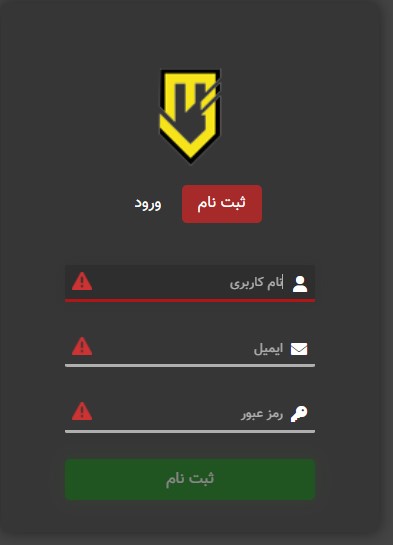
من با foreach توشون پیمایش میکنم درست نشون میده ولی مال همه اینپوت ها رو با هم نشون میده
به این صورت نوشتم
// Variables
const btnSubmit = document.querySelector('#btnSubmit');

const userName = document.querySelector('#userName');
const email = document.querySelector('#email');
const password = document.querySelector('#password');

const forms = document.querySelector('#form');

let valid = document.querySelectorAll('#valid')
let invalid = document.querySelectorAll('#invalid')

// EventListeners
const eventListeners = () => {
    // App Init
    document.addEventListener('DOMContentLoaded', appInit);

    // Vaidate Fields
    userName.addEventListener('keyup', validteFields);
    email.addEventListener('keyup', validteFields);
    password.addEventListener('keyup', validteFields);

    // Submit Forms
    forms.addEventListener('submit', submitForms);
}
eventListeners();

// Functions
function appInit() {
    // Disabled The Button
    btnSubmit.classList.add('disabled');
}

// Validate Fields Of Forms
function validteFields() {
    validteLength(this);

    if (this.type === 'email') {
        validateEmail(this);
    }

    const error = document.querySelectorAll('.error');
    if (userName.value !== '' && email.value !== '' && password.value !== '' && confrimPassword.value !== '') {
        if (error.length === 0) {
            btnSubmit.classList.remove('disabled');
        }
    } else {
        btnSubmit.classList.add('disabled');
    }
}

// Validate Length Fields Of Forms
function validteLength(field) {
    if (field.value.length > 0) {
        // if Exist: Change The Border Bottom Color To Green And Remove The 'error' Class
        field.style.borderBottomColor = 'green';
        field.classList.remove('error');
        valid.forEach(valid => {
            valid.style.display = 'block'
        });
        invalid.forEach(invalid => {
            invalid.style.display = 'none'
        });
    } else {
        // if Exist: Change The Border Bottom Color To Red And Add The 'error' Class
        field.style.borderBottomColor = 'red';
        field.classList.add('error');
        invalid.forEach((invalid) => {
            invalid.style.display = 'block'
        });
        valid.forEach((valid) => {
            valid.style.display = 'none'
        });
    }
}

// Validating Email Fields
function validateEmail(field) {
    if (field.value.includes('@')) {
        field.style.borderBottomColor = 'green';
        field.classList.remove('error');
    } else {
        // if Exist: Change The Border Bottom Color To Red And Add The 'error' Class
        field.style.borderBottomColor = 'red';
        field.classList.add('error');
    }
}

// Submit Forms
function submitForms(e) {
    e.preventDefault();

    // Change The Text-Content After Click The Button
    btnSubmit.textContent = 'در حال دریافت اطلاعات...';
    setTimeout(() => {
        // Print The Message Confrim Register
        btnSubmit.textContent = 'ثبت نام شما با موفقیت انجام شد';

        setTimeout(() => {
            btnSubmit.textContent = 'ثبت نام';
        }, 3000);
    }, 5000);
    // Reset The Forms After Register
    this.reset();
    // disabled The Button After Register
    btnSubmit.classList.add('disabled');

    // Change The Border-Bottom-Color After Register
    userName.style.borderBottomColor = '#fff';
    email.style.borderBottomColor = '#fff';
    password.style.borderBottomColor = '#fff';
}
گفتگوهای مرتبط
شاید پاسخ شما همینجا باشد
بازم اگه نظر منو بخوای وقتت رو بابت چیزی که از قبل نوشته شده هدر نده. ولیدیتور اماده استفاده کن
من دارم جاوا اسکریپت یاد می گیرم برای تمرین هست
به هر حال ممنون🙏

سلام وقت بخیر
برای یاد گیری باید با جزئیات آشنا بشید
و از کتابخونه های آماده در مرحله آخر استفاده می کنید